

Browser for AI agents

The Missing Browser for Claude, Cowork & Codex

BrowserOS neo is a free, open-source browser your agents drive with your logged-in accounts.One-click import your logins from Chrome, connect your agent (Claude Code, Cowork, Codex), and hand off your web tasks. Run many agents at once, and replay any session to see what they did.

Privacy-first

Browsing data never leaves your machine

Tokens

Automation uses fewer tokens

Chrome Import

One click

Price

Free!

Works With

Claude Code, Cowork, Codex, Cursor, OpenClaw, Hermes

Platforms

macOS, Windows

Your agents work in plain sight. Rewind any session.

Your AI is smart. But it can't press the buttons.

Every AI assistant sounds capable in chat, then falls apart the moment it needs to actually open a tab, log in, and click through. BrowserOS neo fixes that: be more productive with agents doing browser work in parallel, learn faster as it opens tabs for you, and trust the output by watching in real time with instant replay when it's done. Not a headless driver with no real logins. Not a cloud browser on someone else's machine. Yours, local, and watchable.

[ 01 ]
What it does

A browser built for your AI to actually use.

We built the four things any agent needs to work in a browser. All shipped today.

Your second browser

Signed in like you are.

A separate browser just for your agents, signed into your accounts (Gmail, GitHub, X, your bank). They work in theirs, you keep yours.

Your browser
Banking
Inbox
Docs
neo agents
Codex: flights
Claude: email
Same logins

Tokens

Same automation, fewer tokens.

Your agent gets compact page snapshots instead of raw HTML, and batches actions in one call. Fewer round trips, smaller bills.

Claude Chrome
BrowserOS neo
Tokens per page
Parallel

Run many agents at once.

Each agent works in its own tab. Fire off three tasks, keep browsing in yours.

ClaudeBooking a flight…
CodexUnsubscribing emails…
CursorFound 3 apartments
Trust

Watch, rewind, verify.

See every agent live, replay any session later, and every action is logged on your disk.

00:4203:16
navigatereadactsubmit

Works with any AI agent.

  • Claude Code logo
    Claude Code
  • Cursor logo
    Cursor
  • Codex logo
    Codex
  • VS Code logo
    VS Code
  • OpenClaw logo
    OpenClaw
  • Hermes logo
    Hermes

Powered by MCP, the open standard for AI integrations

[ 02 ]
What BrowserOS neo does

How your AI actually uses the browser

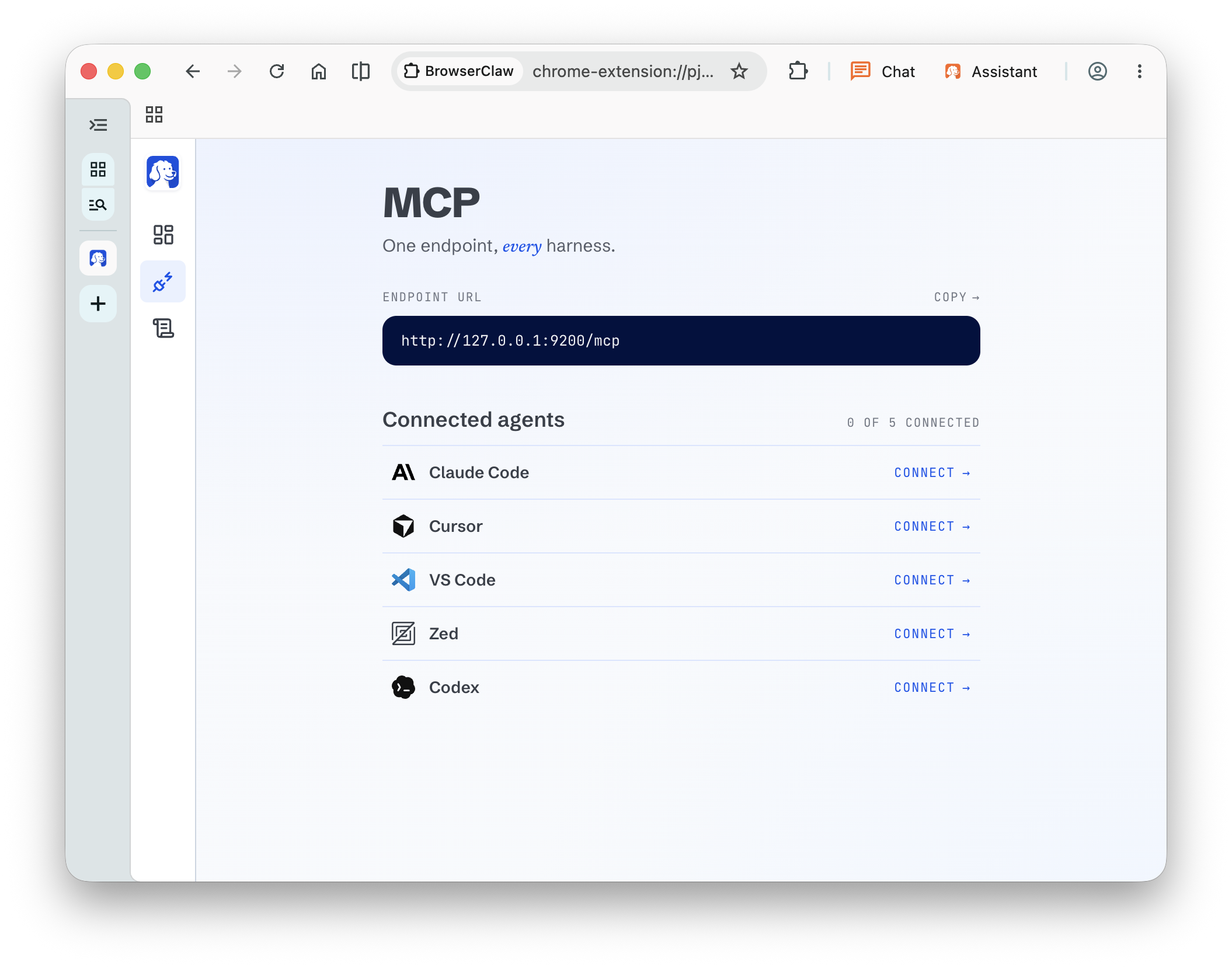
BrowserOS neo MCP install board with the endpoint URL and one-click Connect buttons next to Claude Code, Cursor, VS Code, Zed, and Codex

Step 01

Connect in one click.

Link BrowserOS neo to Claude Code, Cowork, Cursor, or Codex via MCP. No config files, no CLI.

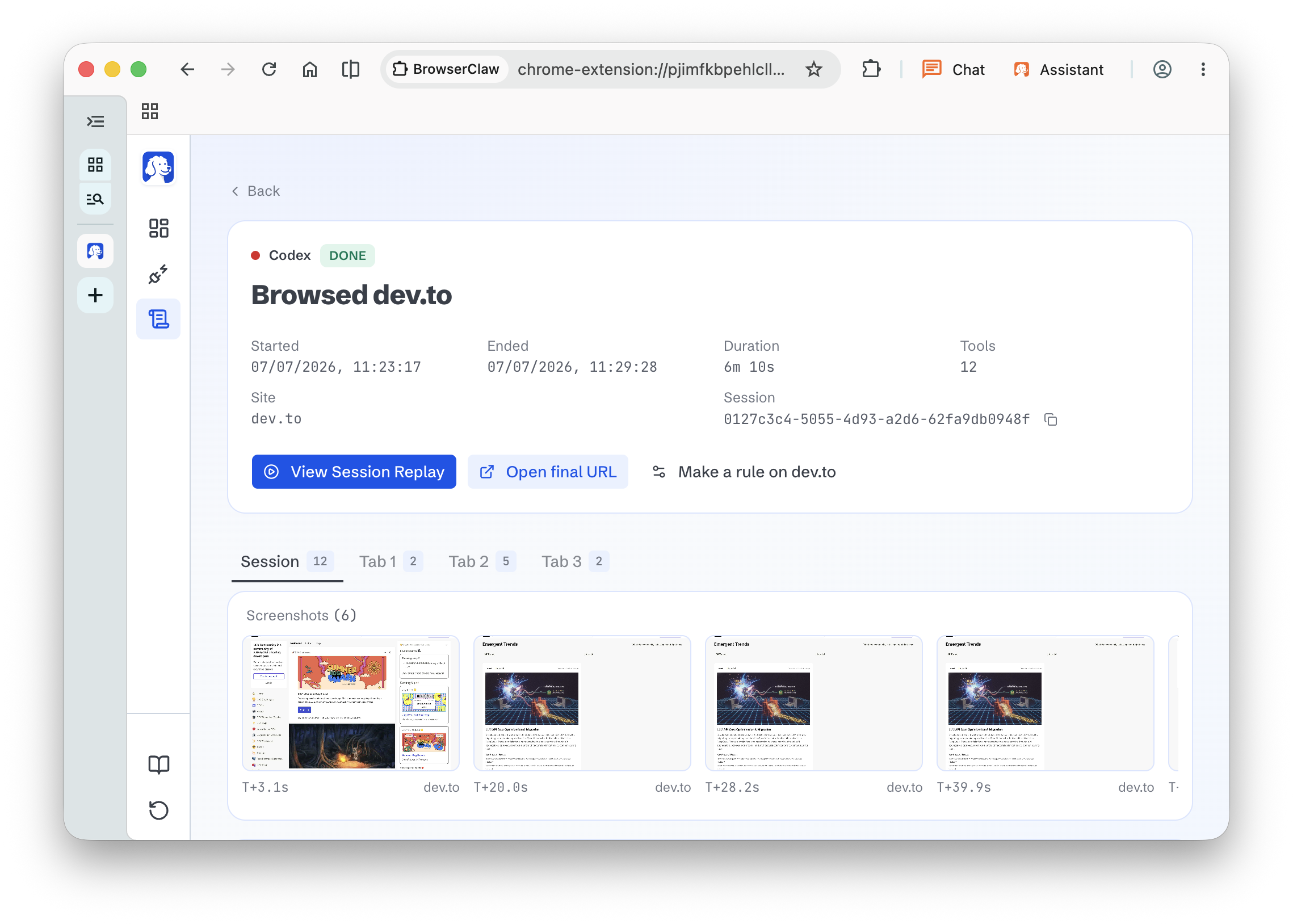
Session detail page for a Codex agent that browsed dev.to, showing run metadata, tabs, screenshots, and view-replay controls

Step 02

Your agent browses live.

Ask in your terminal or IDE. The agent opens tabs, navigates, clicks, and reads the web signed in as you. Watch it happen in real time.

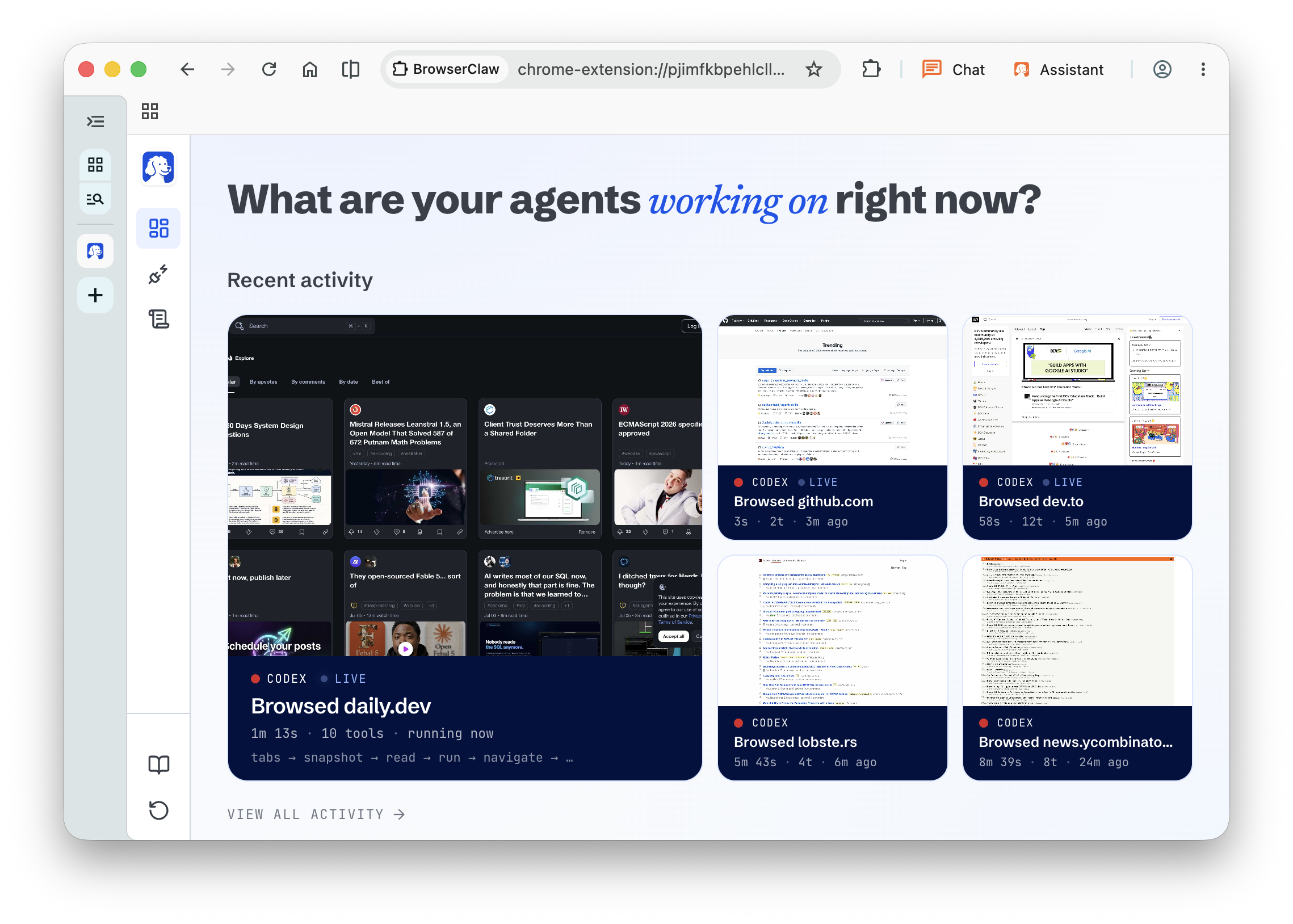
Cockpit home dashboard with a live tile for each site a Codex agent is currently browsing

Step 03

Run several agents at once.

A cockpit dashboard on your new-tab page shows every agent working in parallel: which site, which tool, how many steps. Each runs in isolated, toggle-grouped tabs.

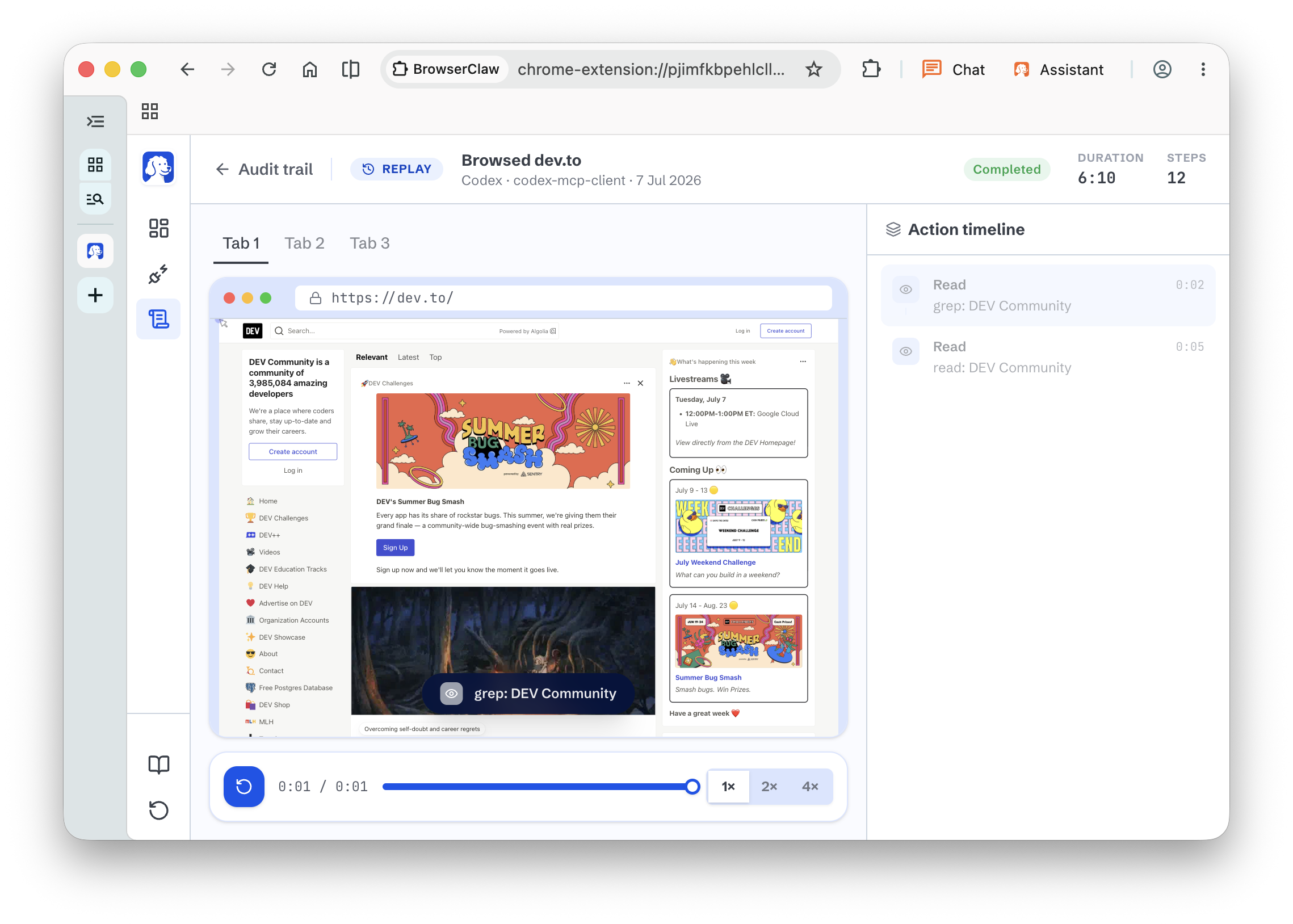
Replay player mid-scrub with tabs, video scrubber, and an action timeline sidebar of tool events

Step 04

Replay any session.

Every run saves as a full-screen, scrubbable video. Rewind, find the mistake, and coach the agent for next time.

Your stuff stays yours.

Your work stays uninterrupted.

Every agent opens its own tabs to work in and never touches the ones you already have open. It cannot close the doc you are writing, cannot steer the tab you are actively using, cannot step on your live window. You keep working while it works next to you.

Everything runs on your machine.

Session history, screenshots, replays, and settings are files on your disk. Nothing goes to a dashboard we own. Open source, top to bottom.

[ 03 ]
Compare

Your agents work.You keep browsing.

BrowserOS neo is your secondary browser, built for agents. They browse here with your real logins, while your main browser stays yours for work.

What does the job
What each one does: BrowserOS neo compared with agent-browser, Browser Use, Dia, and Perplexity Comet
The jobBrowserOS neoagent-browserBrowser UseDiaPerplexity Comet
Works with my own agent (Claude Code, Cowork, Codex, Cursor)YesYesYesNoNo
Agent uses my real logins, no setupYesNoNoYesYes
Browsing data stays on my machine (privacy-first)YesYesYesNoNo
Replaces Chrome as my daily browserYesNoNoYesYes
I can run many agents at onceYesNoNoNoYes
I keep browsing while my agents workYesYesYesNoYes
I can replay what my agent didYesNoNoNoNo

Get started in two minutes.

01

Download the browser.

Free for macOS and Windows.

macOS logomacOS
Windows logoWindows
02

It finds your agents.

Open BrowserOS neo once. It spots Claude Code, Codex, and Cursor already on your machine and connects with one click.

03

Give your AI a task.

Ask right from Claude Code, Cowork, or Codex. When the task needs the web, your agent reaches for BrowserOS neo and gets it done.

[ 04 ]
FAQ

Questions.

Everything you need to know about BrowserOS neo.

BrowserOS neo is a free, open-source browser your AI agents drive using your logged-in accounts. Your AI opens its own tabs inside it, and you watch, approve, and audit every step from a dashboard on your new-tab page.

Yes. BrowserOS neo is completely free and open source under the AGPL-3.0 license. You bring your own AI provider keys.

Any AI agent that supports MCP, which is essentially every serious AI coding tool today. Claude Code, Cursor, Codex, VS Code, Zed, and GitHub Copilot install with one click. Anything else connects with a URL.

Yes. Open BrowserOS neo, click Connect on the Claude Code row in the MCP install board, and Claude Code has a browser.

Yes. Codex is supported through the same one-click install as every other harness. No config file editing.

Yes. Claude Cowork connects through the same one-click MCP install as Claude Code, Cursor, and Codex. Any agent that speaks MCP can drive BrowserOS neo.

BrowserOS neo runs entirely on your own machine. It is not a cloud browser and not a headless driver. Your logins, sessions, screenshots, and replays are local files, and nothing goes to a server we own.

A headless browser has no real logins, so agents never touch your actual accounts. BrowserOS neo is a full browser signed in as you, so agents do real work, and you can watch every step live and replay it afterward.

Yes. BrowserClaw is now BrowserOS neo — same browser, same project, new name. Nothing you installed stops working, and you do not need to download it again. You will still see the old name in a few places we have not caught up with yet, like the GitHub repository and the MCP server name.

Not required. BrowserOS neo is a standalone browser you install on macOS or Windows. If you also use BrowserOS as your daily human browser, the two products live side by side.

Everything runs on your machine. Session history, screenshots, replays, and settings are files on your disk. Your logins stay in your browser profile, same as any browser you use. Nothing goes to a dashboard we own. Open source, top to bottom.

Yes. Every agent gets its own set of tabs, tracked separately. Codex and Claude Code can each work on their own tasks at the same time without stepping on each other.

No. Every agent opens its own tabs to work in and never touches the ones you already have open. It cannot close the doc you are writing or steer the tab you are actively using. You keep working while it works.

Yes, that is the point. Agents drive BrowserOS neo using the sessions you already have, so they automate your real work instead of poking a sandbox with no context. Per-agent profile isolation is on the roadmap if you want to keep them apart.

Yes. Every session is saved as a scrubbable video. Rewind, spot the moment things went sideways, and give the agent a better instruction next time.

macOS and Windows. System requirements match Google Chrome or Safari.

Yes. BrowserOS neo is fully open source. The source code lives at github.com/browseros-ai/BrowserOS.

[ 05 ]
Use cases

Put your logged-in web to work.

Public APIs stop at the front door. BrowserOS neo lets your agent do the work waiting behind sign-in — in its own tabs, while you keep yours.

x.com/compose/post
yousigned in as you
Task 01 · Marketing

Turn this launch note into posts for X, LinkedIn, and Reddit.

Short X draft written, link included.

saved locally

Give your AI its own browser.

Free. Open source. Yours. Runs on your machine.

AGPL-3.0 license * 12k GitHub * Works with any AI agent